
Token maker › Foundry VTT token maker
Foundry VTT token maker
For Foundry VTT, make a square token image with a transparent background, upload it through the File Picker into your Data folder, then choose it as the Image on the actor's Prototype Token. Foundry's media guide puts token art for Medium and Large creatures between 200 and 400 pixels square, calls 400 × 400 an industry standard, and recommends WebP or PNG so the background stays transparent.
Checked against the Foundry VTT knowledge base on 2 October 2026. Foundry's dynamic ring article was updated for V13, so check it if you run another version.
Which Foundry setting controls what
Foundry splits a creature's appearance across several settings. Mixing them up is the usual reason a token looks wrong.
| Setting | What it controls |
|---|---|
| Actor artwork | The picture on the character sheet and in the sidebar. Separate from the token. |
| Token artwork (Image Path) | The picture shown on the canvas, set in the Appearance tab of Token Configuration. |
| Dimensions | How many grid units the token occupies. This is the creature's footprint. |
| Scale | A ratio for the artwork only. Above 1 enlarges the picture and below 1 shrinks it, and Foundry states the base size in grid units is unaffected. |
| Prototype Token | The template stored with the actor. A placed token starts as a copy and then becomes independent. |
How to add a token to Foundry VTT
Make and save the token
Open the token maker with the Foundry size selected, build your token and save the PNG. It will be 400 × 400, at the top of the 200 to 400 range Foundry recommends.
Name the file safely
Foundry serves your Data folder like a website, so its documentation asks for names that suit web URLs. For example, stick to letters, digits and hyphens, and avoid spaces and special characters.
Upload it with the File Picker
Open the actor's Prototype Token, go to the Appearance tab and use the file button beside Image Path. Choose a folder inside your Data directory, such as one under your world, and upload the PNG there. Anything in Data is publicly served to connected players.
Set the footprint, then the scale
In the same tab, set Dimensions to the creature's size in grid units (1 for Medium, 2 for Large and so on). Only touch Scale if the artwork looks too small or too large inside its square.
Place it and check
Drag the actor onto a scene. Tokens already on a scene are independent copies, so change those individually or replace them. Set the actor's sheet artwork separately if you want it to match.
Four tokens made with the tool
Straight from the creator, not retouched. At 256 × 256 they are a little under the 400 pixel standard, and the Foundry preset saves at 400 × 400.
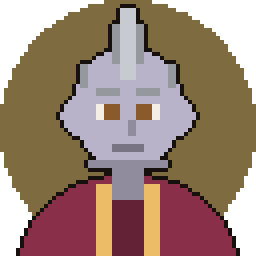
Crested helm 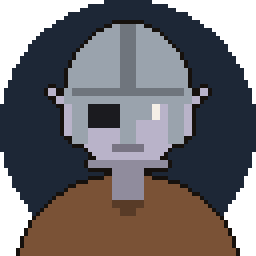
One-eyed soldier 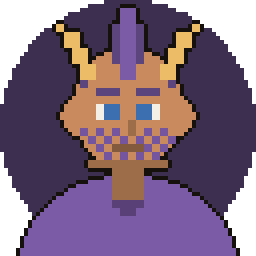
Gold-horned mystic 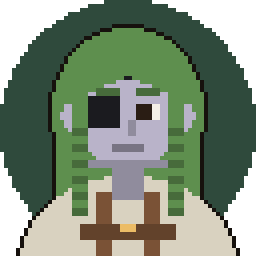
Braided scout
Dynamic token rings: when they affect your art
Foundry has a core feature called dynamic token rings. You turn it on per actor by ticking Ring Enabled in the Prototype Token configuration, and it is opt-in. The artwork you supply becomes the ring's subject texture, and Foundry draws the ring itself.
What the ring article asks of the art. Save the subject without any ring or background, and keep it inside the inner two thirds, because the ring starts two thirds of the way from the centre and uses the outer third. Anything that should be hidden by the ring must be masked or deleted. Power-of-two sizes are recommended: 256 pixels for Tiny, 512 for Small and Medium, 1024 for Large and 2048 for Gargantuan.
Our honest take. The Foundry preset exports 400 × 400 for ordinary tokens, which is not one of those power-of-two sizes. Tokens from the creator also tend to fill their canvas and can include a backdrop colour. We have not tested them with rings enabled. If you want rings, leave the backdrop off and expect to shrink the art inside the canvas, or just keep the ring switched off.
Common Foundry token mistakes
- Changing the prototype and expecting placed tokens to follow. A placed token is its own copy, so edit it or place a new one.
- Making a creature bigger with Scale. Scale only resizes the artwork. Use Dimensions for the footprint.
- Spaces and odd characters in file names. Foundry serves Data over the web, so use clean names.
- Diagonal or tilted art. Foundry's guide says token art should face directly south, because Foundry cannot correct the starting orientation.
- Assuming the sheet picture is the token. Actor artwork and token artwork are separate, and each is set in its own place.
- Turning on rings with a framed picture. A baked-in frame or backdrop fights the ring. Use art without them.
Frequently asked questions
What size should Foundry VTT token art be?
Foundry's media guide says tokens for Medium and Large creatures are between 200 and 400 pixels square, and that 400 × 400 has become an industry standard. The guide says that leaves enough detail for players to zoom in up to 3x. The Foundry preset on this site saves 400 × 400.
Should I use PNG or WebP?
Both keep transparency. Foundry's guide recommends WebP as the best quality for the file size, and says PNG is fine for small tokens where size stays manageable. A pixel-art token is small, so PNG is a safe choice.
What is the difference between actor artwork and token artwork?
Actor artwork is the picture on the character sheet and in the sidebar. Token artwork is what appears on the canvas. You can use the same file for both or different ones.
How do I make a token cover more than one square?
Set Dimensions in the Appearance tab to the number of grid units the token occupies. Scale only changes how large the picture looks inside that footprint.
Do I have to use dynamic token rings?
No. Rings are a core feature but opt-in, enabled with Ring Enabled on the Prototype Token. If you do use them, the artwork should fit inside the inner two thirds of the image and carry no ring or background.
Can I give one actor several token pictures?
Foundry's guide describes naming variants with a shared prefix, such as guard-red.png and guard-green.png, so a wildcard path like guard-*.png can pick between them. Put the variable part after the shared prefix.
Running the game yourself?
CartoSmith is a battle map app for DMs, with fog, lighting and encounters, if you want a map you run yourself rather than a tabletop site.